
Extraction:
I am sure all of you know how to extract xD . The password for all safelinking.net links and rar files is “Silent.Hunter” (without quotes). However , at some point of time you may encounter this error :

Please note that its not a problem of the password or the uploaded files , rather one or more part(s) may be corrupted while downloading. It happens due to many reasons .. best way to avoid is to use IDM.
To fix this, re-download the part(s) which is/are corrupted … like in my above screenshot example, part 2 came out to be corrupted. So, just delete the corrupted part(s) & re-download it.
How to Fix a Game?
3D-Analyzer - Download
Each unique game requires different settings in 3D-Analyzer. For the purposes of this tutorial I will be using Far Cry, a video game debuted in 2004. To give you a reference point to compare 3D-Analyzer’s handywork, this is what Far Cry looks like on my Intel GMA 4500MHD integrated graphics card before I run 3D-Analyzer:

Step by step Instructions :
First Download 3D analyzer-v2.36.exe – Click here
- Start 3DAnalyze.exe. Note that the program window cannot be resized. You should see something like this:

- Hit the “Select” button. Locate and open your game’s EXE game launcher. For me, the EXE file is FarCry located in FarCry’s installation folder:
If you don’t know which EXE file to choose, you can always right click on your game shortcut (the one that you click on to launch the game, typically found on your desktop) and click on Properties; then, under the shortcut tab, look in Target for your game launcher:

- Check-off the appropriate settings in 3D-Analyzer. As already mentioned, each game will have slightly different settings. Far Cry works best in the following settings:

- One important feature to note is the “VendorID” and “DeviceID” section:

This tricks your game into thinking you are using a different graphics card. 3D-Analyzer provides a list from which you can pick VendorIDs and DeviceIDs from:
As you can see, you can choose between an NVIDIA or ATi graphics card. Take note setting the IDs to “0″ makes 3D-Analyzer default to your real graphics card/integrated chip.
- NVIDIA Geforce Ti 4600 :- VendorID: 4318 and DeviceID: 592
- NVIDIA GeforceFX 5900 ultra :- VendorID: 4318 and DeviceID: 816
- Ati Radeon 8500 :- VendorID: 4098 and DeviceID: 20812
- Ati Radeon 9800 pro :- VendorID: 4098 and DeviceID: 20040
this are the setting which will work for mostly all games but if you want to add anything more, feel free to do so.

- Once you are done, unless you plan on never playing the same game again, should hit the “Save batch file!” button and save the settings; so instead of doing the above all over again the next time you play, just launch the batch file and it will automatically configure the settings for you.
- Hit the “Run” button and voila! Get gaming!
This is what Far Cry looks for me after running 3D-Analyzer:
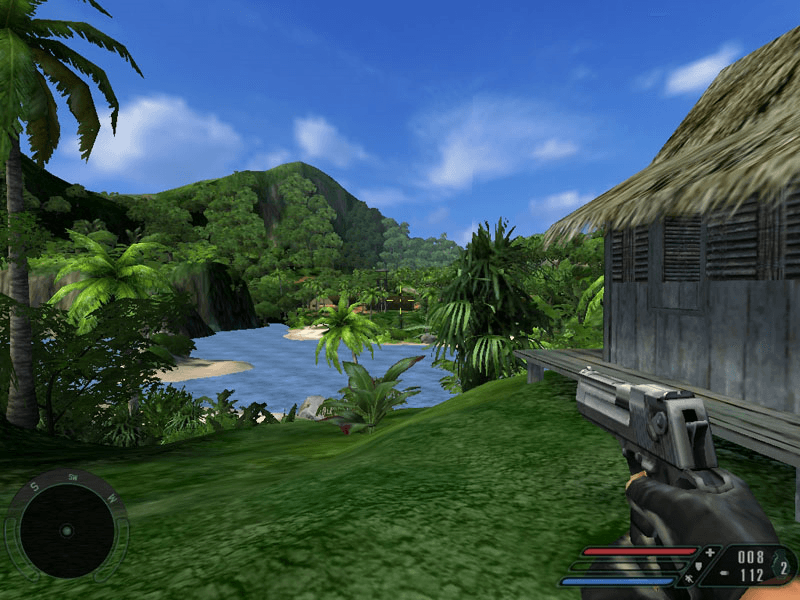
Ain’t she a beauty!
Download 3D-Analyzer
Troubleshooting:
The best way to avoid any problems while playing the game is to install latest drivers (sound, audio) & a group of supporting softwares.
* Software Essentials *
Make sure u have the following softwares, that will make your job to run the game easier …1. Update your graphic & audio drivers.For Nvidia :http://www.nvidia.com/For ATI :http://support.amd.com/*For audio search urself according to ur model etc2. Install the latest DirectX:http://www.softwarepatch.com/windows/directxdownload.htmlNote this will cover errors like – d3dx9_xx.dll3. If u are running WinXP or below, make sure u have (Not required for vista/7) :Visual C++ Redistributable:http://www.microsoft.com/downloads/details.aspx?familyid=A5C84275-3B97-4AB7-A40D-3802B2AF5FC2&displaylang=en.NET Framework 3.5:http://www.microsoft.com/downloads/details.aspx?FamilyId=333325FD-AE52-4E35-B531-508D977D32A6&displaylang=en4. Extraction Software:I would highly recommend 7zip for all extraction purposes. Winrar doesnt work with all extensions and Hj-Split gives no extension sometimes.7zip:http://tinyurl.com/62ry9o35. Mounting Software:Daemon Tools:http://safelinking.net/p/8a9206343c6. Games For Windows Live Redistributable ( search on google for setup )These are 6 essentials you MUST have in order to run the game properly.

** Finally, if you are getting any sort of error, make sure to use google … 99.9% of your problems will be resolved by it. Each the game has been downloaded and tested by atleast 12k people. So any problem will be at your end and will be solved by doing a quick google search  You can put a comment below the game if by chance you are encountering issue, but make sure to place the comment below that game ONLY otherwise it may not get my attention.
You can put a comment below the game if by chance you are encountering issue, but make sure to place the comment below that game ONLY otherwise it may not get my attention.


Post a Comment